Withdraw to an eligible local bank account
Review the exact source balance, destination account, exchange rate, fee, amount received, limits, and estimated timing on the confirmation screen before every unfamiliar withdrawal.
Start in the withdrawal area
Select the source balance and an eligible verified bank account. Check that the account owner, country, and currency are correct.
Same currency or conversion
A withdrawal can involve:
- A same currency transfer where supported
- Conversion by Payoneer
- Conversion or intermediary charges at the receiving bank
The true cost is the difference between the source funds and the amount that arrives after every fee and conversion.
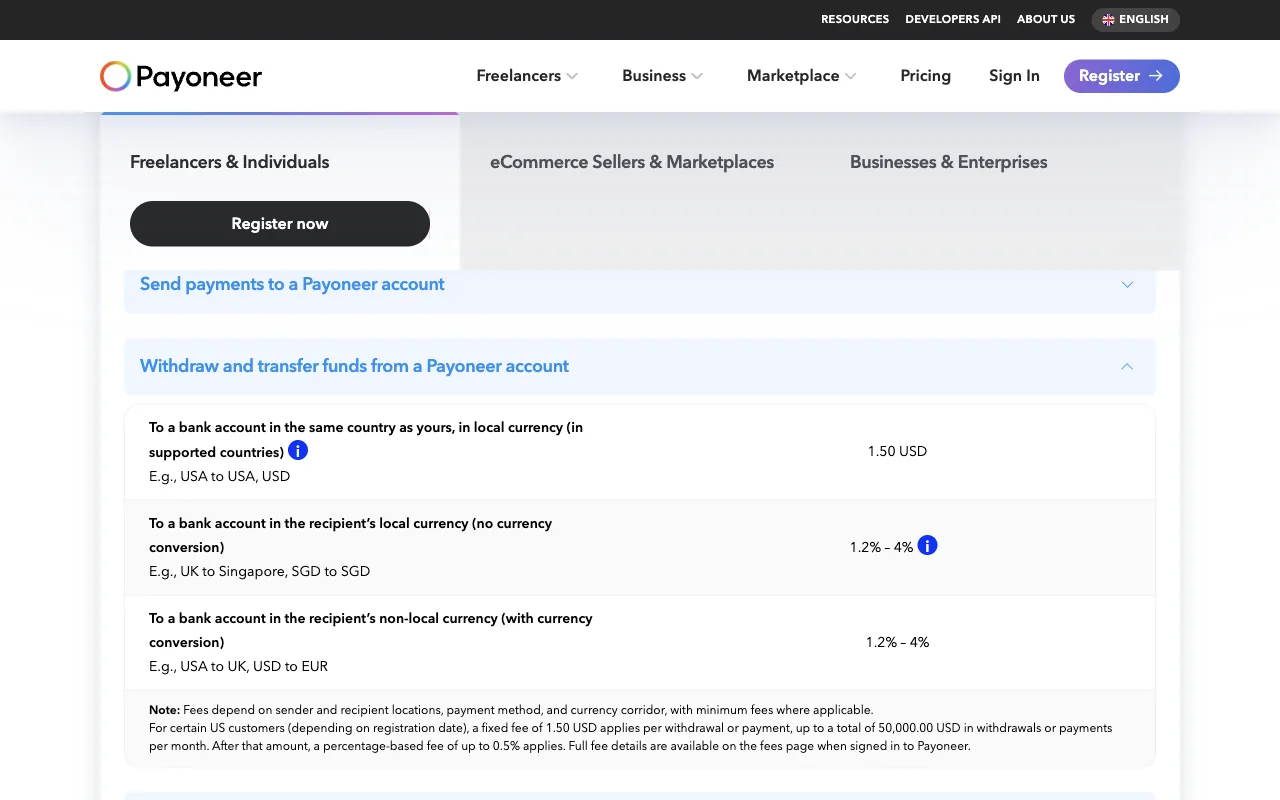
Source: Payoneer's official pricing information, accessed July 2026. Pricing varies by account, country, currency, and transaction. The confirmation screen for your withdrawal is the final preapproval reference.
Review before confirming
Check:
- Source currency and amount
- Destination account and currency
- Exchange rate when conversion occurs
- Payoneer fee
- Expected amount received
- Minimum and maximum limits
- Estimated processing time
Save the receipt and compare it with the bank statement after arrival. If the totals differ, identify whether the difference came from Payoneer, an intermediary, or the receiving bank.
Lesson checklist
- I reviewed the exact fee and exchange rate before confirmation
- The destination account and currency are correct
- I understand any minimum or maximum
- I reconciled the completed withdrawal
The final lesson protects the account and prevents common mistakes.