Connecting accounts: how credentials work
Some nodes, like RSS, need no account at all. But Gmail, Sheets or your own store want access to your account. This lesson shows how credentials work in n8n, and what happens to them when you share a workflow.
The RSS flow we built in the previous lesson ran without connecting a single account, because RSS is a public feed. Most of the flows you'll build in real life are not like that. The moment you want to send mail from your Gmail, add a row to a Google Sheet, or pull orders from your own store, n8n needs access to your account.
What a credential is
In n8n that access is set up once, and it's called a credential. Connect an account a single time, and every node that uses that account stops asking you to repeat the process. You just pick the credential you already created.
In the automation fundamentals course I called this a connection. Same concept, and in n8n it goes by the name credential.
The logic works like this: when a node needs access to an account, it first asks you which credential to use. If you've already created one for that account, you pick it from the list. If you haven't, you create a new one. If you use the same Gmail account across five different flows, you don't set the credential up five times. You set it up once and select it in five places.
What the credential screen looks like
When a node needs an account, a form opens: you choose which account you want to connect, then you sign in to that account and grant permission. The form holds the connection details, and you can reuse that credential in any node you like.
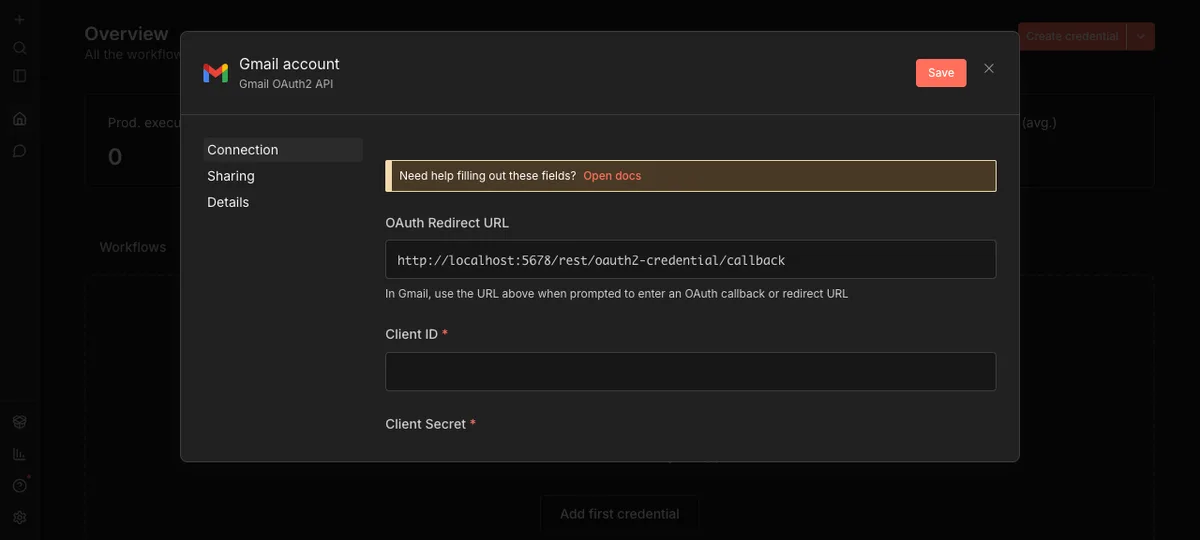
Source: n8n panel (local install), accessed July 2026.
We're not connecting a real account in this course, because the point is to show you the logic. When you go to connect Gmail, Sheets or your store account in your own flows, the screen you'll see is the same form as the one above. Only the fields change, depending on which account you opened it for.
A note on security
A fair question might come to mind here: "If I share a flow with someone, do my account details go with it?" No. Credentials do not travel when a workflow is shared. When you download a template or import a workflow, you choose and connect the accounts yourself. The account of the person who built that template never reaches you.
This is an important security principle, and it's worth stating plainly: the architecture of the boxes gets shared, account access does not. Every user sets up their own credentials.
That has a practical consequence. When you import a workflow, you'll usually see a warning marker on the nodes that are waiting for a credential. Don't panic and start rebuilding everything. Just click that node, look at which account it wants, and connect your credential. The rest of the nodes, the ones that need no account at all, like RSS, keep working untouched.
In the next lesson we'll look at importing a ready made template, instead of building everything from scratch.